Abstract
Humanoid motion trackers know where the body should be, not how hard it should act on the world. Ctrl-F adds that missing channel: an explicit 3-D force command at each designated force body, a hand or a foot in our experiments. A motion–force tracker, trained without any object, realises the commanded force while following the reference motion, and a high-level planner chooses the command online from object state and proprioception. On a Unitree G1 this drags, pushes, raises and kicks loads up to 20 kg where a force-blind tracker moves nothing, and the high-level planner adapts its command when the object's mass changes mid-task.
Video
A pose says nothing about interaction
Method
The interface is a reference motion plus a force command. A low-level tracker follows the motion and produces the commanded force at each force body. A high-level planner decides that force.
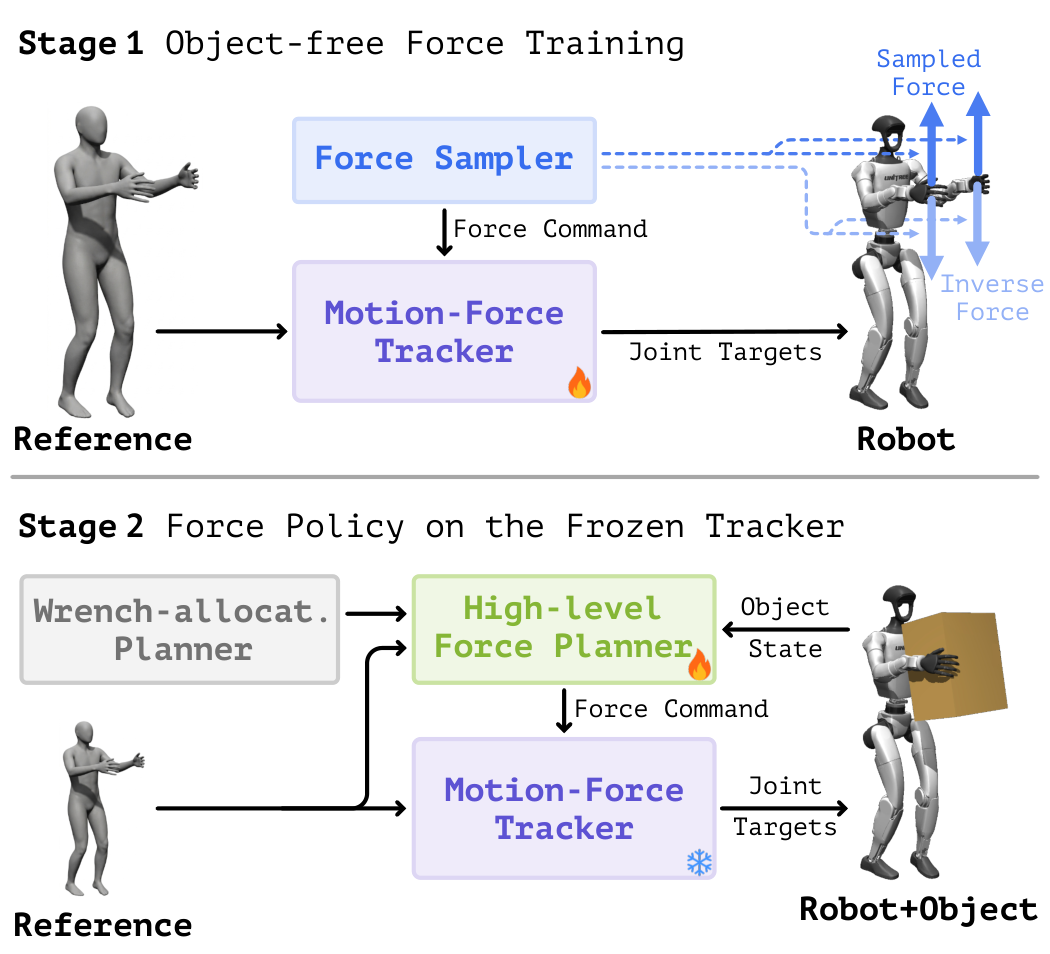
Stage 1: train the tracker to realise a commanded force
Training has no objects. Each episode samples a 3-D force command for a force body and applies the opposite wrench to it. The only way to hold the reference pose under that wrench is to push back with exactly the commanded force, so the tracker learns the correspondence between a force command and the action that realises it.
The trained tracker under an external force. The hand sinks when only the wrench is applied and recovers once the matching command is given. (0.5×)
On hardware, the commanded force measured on a crane scale. (0.5×)
Stage 2: learn what force to command
With the tracker frozen, a planner reads the object state and the robot's proprioception and outputs one force command per force body. It is trained with an analytical wrench-allocation model as its teacher and refined by reinforcement learning scored on the object's motion. Its command adapts when the load changes.
Mid-task mass change in simulation. Green arrows are the force commands. (0.5×)
Hardware
Unitree G1 with onboard sensing and AprilTag object pose. SONIC is the baseline and runs the same clips on the same objects. Loads are the weight added to the object.
Drag a crate
Wheels locked. SONIC moves only the empty crate. Ctrl-F moves all three.
Push a box
SONIC moves neither box. Ctrl-F pushes both.
Raise a box, 2 kg
SONIC's hands slide off the box. Ctrl-F lifts it in 9 of 10 trials.
Sweep a box, 1 kg
SONIC cannot balance on one leg and never moves the box.
Stand kick
SONIC cannot stand and kick on one leg. Ctrl-F kicks both the empty box and the 20 kg one.
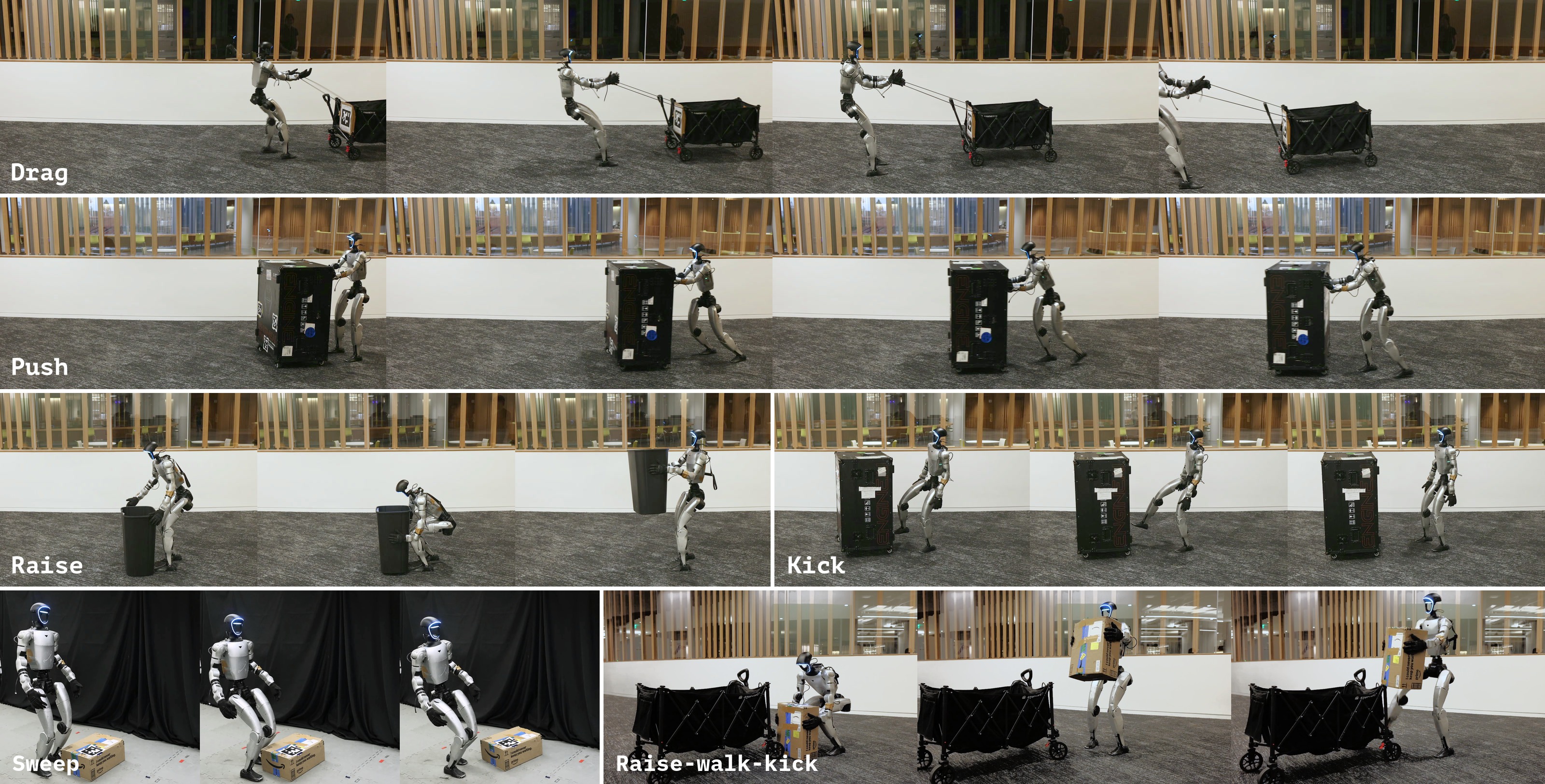
Hardware deployment.
Load changes mid-task
Weight is added while the robot is already working. The planner's command follows the load, with no force sensor in the loop.
Drag, weight added
SONIC stops. With the command frozen, the robot slows down. With the planner, it keeps its pace.
Hold a load, 1 + 1 kg
Same network in both. With the command held at zero, the hand sinks as weight is added. With the planner, it stays at the reference height.
Simulation
Nine tasks using the hands, the feet, or both. Object mass is randomised between episodes and changed during them.
The nine tasks, with the planner's force commands drawn in green.
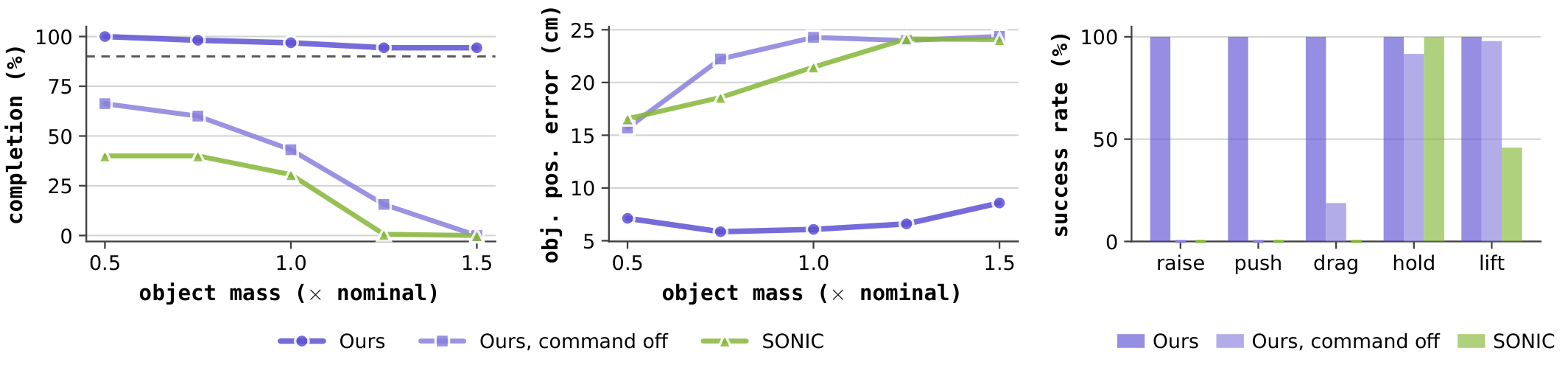
Without the force command, completion drops as mass grows. Ctrl-F stays above 90% across the range.
Try it
The trained policies, live in your browser on MuJoCo physics. In the first demo you set the force command yourself and the tracker realises it. In the other two the command comes from the learned high-level planner.
Citation
@misc{zhao2026ctrlf,
  title         = {Ctrl-F: Force as an Interface for Humanoid Loco-Manipulation},
  author        = {Mengjie Zhao and Yuxin Chen and Yiyang Shao and Chuye Hong and
                   Jiakang Chen and Koushil Sreenath and Masayoshi Tomizuka},
  year          = {2026},
  eprint        = {2611.05507},
  archivePrefix = {arXiv},
  primaryClass  = {cs.RO},
  url           = {https://arxiv.org/abs/2611.05507}
}
Built on mjlab and MuJoCo Warp.